

Go  | New | Find | Notify | Tools | Reply | |
| spam | Login/Join |
Member![Picture of the_Licker[1.01]](http://www.lowcaliber.com/avatars/lick.gif "Picture of the_Licker[1.01]") |
i keep on getting this message on my computer, i dont know how to get rid of it either, it seems to come on if im connected to the net, even if al progs are off, can anyone help me get rid of it, it even comes up playing rune  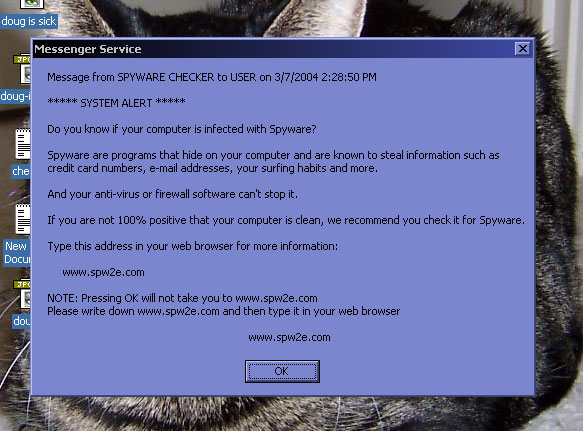 spam.jpg (70 Kb, 113 downloads) spam spam.jpg (70 Kb, 113 downloads) spam | ||
|
Sunshine |
Hit WinKey+R (opens Run), then types "services.msc"... now go find MESSENGER under Name, right click and choose properties (or double-click), then choose Startup Type and "disable" to disable the service. And what assholes.... what thye're doing helps a lot less than spam. I killed messenger service right when I started running under DMZ because I didn't want to deal with that crap. Whoo. | |||
|
Magistrate |
turn on your xp firewall | |||
|
| Member |
thanks Pencil i think thats sorted it out mate, how does it get onto the system anyhow? is it just with msn messenger it comes? | |||
|
| Sunshine |
Messenger Service is for contacting other people on your network and such. Like with it enabled, in RUN or a DOS Prompt I can just type "net send melissa you smell like smells" and it'd send the same thing to her, but with the text I chose. It is pretty weak, actually... bah. | |||
|
Secretary |
Dude that is a screwball anti-spyware spyware program. Go into regedit. windows key then r then type regedit. Go through the file tree system. HKEY_LOCAL_MACHINE folder SOFTWARE folder Microsoft folder Windows folder CurrentVersion folder Click the Run folder To the Left will be a list of On startup run processes. Send me a pic on MSN of the processes and I will tell you which ones to delete. | |||
|
| Member |
cheers mid ill sho u next time im on msn | |||
|
| Powered by Social Strata |
 | Please Wait. Your request is being processed... |
|
© Low Caliber Club 2002-4